

Spam submissions can make a useful website form difficult to manage. Instead of genuine enquiries, your inbox fills with automated messages, suspicious links, and irrelevant offers.
If you are looking for a way to add CAPTCHA protection to WordPress, Cloudflare Turnstile is an option worth considering. It checks visitors without asking them to solve traditional image puzzles.
One detail to understand before getting started: Google reCAPTCHA and Cloudflare Turnstile are separate products. You are adding Turnstile as an alternative to reCAPTCHA, rather than installing reCAPTCHA through Cloudflare.
This guide explains how to set up Turnstile on WordPress and check that your forms still work correctly.

What Is Cloudflare Turnstile
Cloudflare Turnstile is a verification tool that helps websites detect automated activity. It uses browser checks to assess visitors and can request a simple interaction when needed.
You can use Turnstile without moving your website hosting or routing your website traffic through Cloudflare. A Cloudflare account is required to create and manage your widget.
Turnstile protects the forms where it is integrated. Adding it to a contact form does not automatically protect every page or replace your website’s other security measures.
Google reCAPTCHA vs Cloudflare Turnstile: What Is the Difference
Both tools help identify automated activity, but their visitor experience and pricing differ. Cloudflare’s product is called Turnstile, even though people sometimes search for “Cloudflare reCAPTCHA.”
Neither tool guarantees that every spam message will be blocked. The integration must also handle failed verification correctly so visitors cannot bypass the check by submitting directly to your form endpoint.
For a straightforward business contact form, Turnstile is a practical choice if you want verification without image puzzles. Google reCAPTCHA may suit a site already using Google’s risk-scoring workflow. Check your form builder’s compatibility before switching.
Is Cloudflare Turnstile Free or Does It Have a Fee?
Cloudflare Turnstile has a Free plan with unlimited challenges. It currently allows up to 20 widgets per account and 10 hostnames per widget. You do not need a paid Cloudflare website plan to use it.
Cloudflare also offers an Enterprise plan for additional capabilities, such as more widgets, expanded hostname management, and removal of Cloudflare branding. Enterprise pricing requires contacting Cloudflare sales. High traffic alone does not create a per-challenge charge on the Free plan.
The Simple CAPTCHA with Cloudflare Turnstile plugin used in this tutorial is also free. However, a form builder’s paid licence, hosting, or professional installation work may have separate costs. For example, Elementor Pro’s Form widget requires Elementor Pro; Turnstile does not make that feature free.
Is Google reCAPTCHA Free?
Google reCAPTCHA has a free allowance, but it should not be described as unlimited free protection.
At the time of writing, Google’s published pricing includes:
- Up to 10,000 assessments per month: free, with the allowance aggregated across all accounts and sites in an organization.
- 10,001–100,000 assessments per month: a US$8 flat monthly fee under the listed Premium usage tier.
- Above 100,000 assessments: usage pricing of US$1 per 1,000 assessments beyond that threshold.
Paid usage requires Google Cloud billing. An assessment is a verification or risk-evaluation request, rather than necessarily one visitor or one submitted enquiry; usage depends on your integration.
Pricing reviewed on 11 October 2026. Review the Cloudflare Turnstile plans and Google reCAPTCHA pricing before implementation, as plans and allowances may change.
What You Need Before Starting
Have the following ready:
- Access to your Cloudflare account.
- WordPress administrator access.
- Your website hostname, such as leemelworks.com.
- The name of your form plugin or page builder.
- A backup or staging website for testing changes.
Check whether your form builder already includes a Turnstile integration. If it does, you may be able to configure protection there without installing another plugin.
The walkthrough below uses Simple CAPTCHA with Cloudflare Turnstile, a third-party WordPress plugin by Elliot Sowersby / RelyWP.
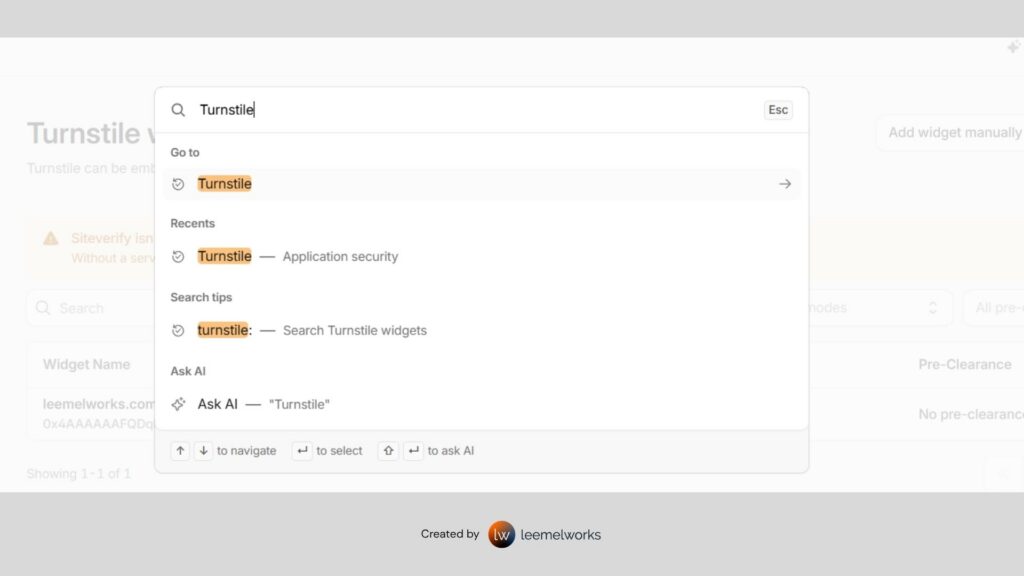
Step 1: Create a Cloudflare Turnstile Widget
Sign in to your Cloudflare dashboard and open Turnstile. Select Add widget.
Give the widget a descriptive name, such as “LeemelWorks Website Forms.” Add the hostnames where you will use it. Enter hostnames rather than full page URLs: use leemelworks.com, without https:// or /contact/.
Check that the hostname visitors actually use is allowed, including any relevant subdomain or staging hostname.
For the widget mode, choose Managed for this walkthrough. Cloudflare decides whether a visitor needs to interact with the widget. The other modes are Non-Interactive and Invisible.
Leave pre-clearance disabled unless your implementation specifically needs it. Standard form verification does not require it.
Select Create. Cloudflare will provide a site key and secret key. The site key identifies the widget on your website; the secret key is used for verification on the server. Keep the secret key private.
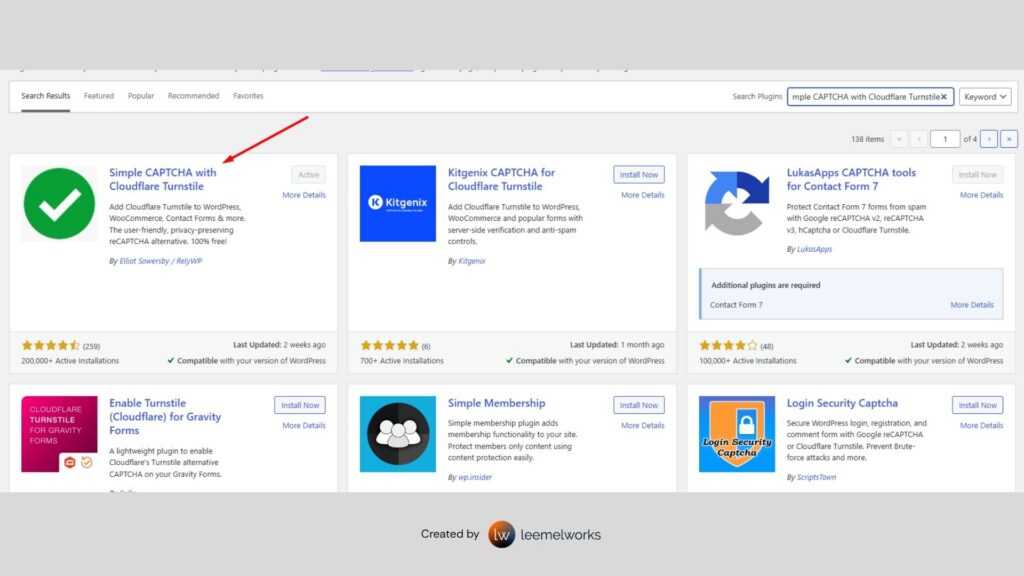
Step 2: Install the WordPress Plugin
In WordPress, go to Plugins → Add New Plugin. Search for Simple CAPTCHA with Cloudflare Turnstile, confirm the author, then install and activate it.
Open Settings → Cloudflare Turnstile. Enter your site key and secret key in the matching fields.
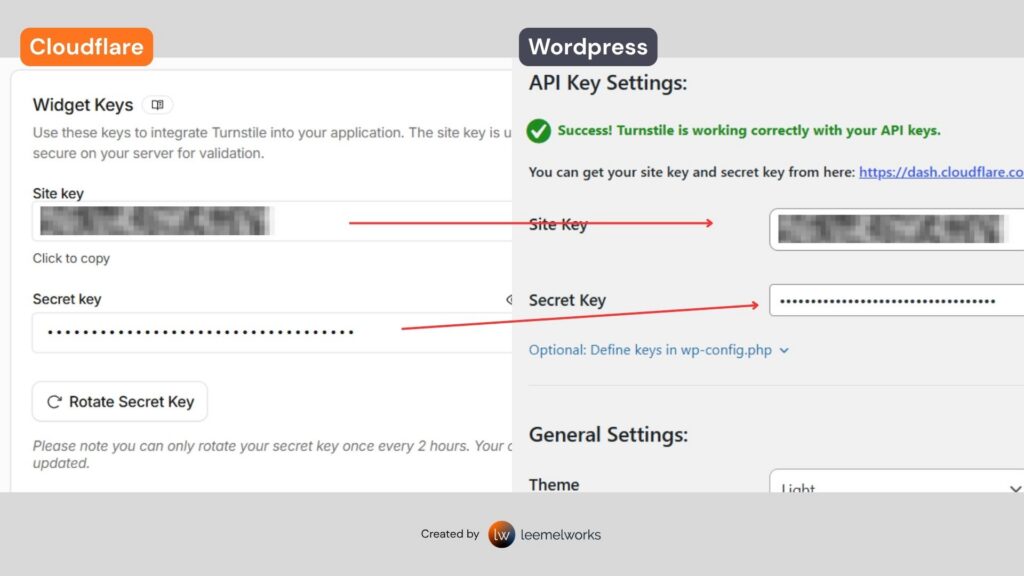
Select the supported forms you want to protect, save the settings, and complete the plugin’s TEST API RESPONSE check. Protection requires a successful test.
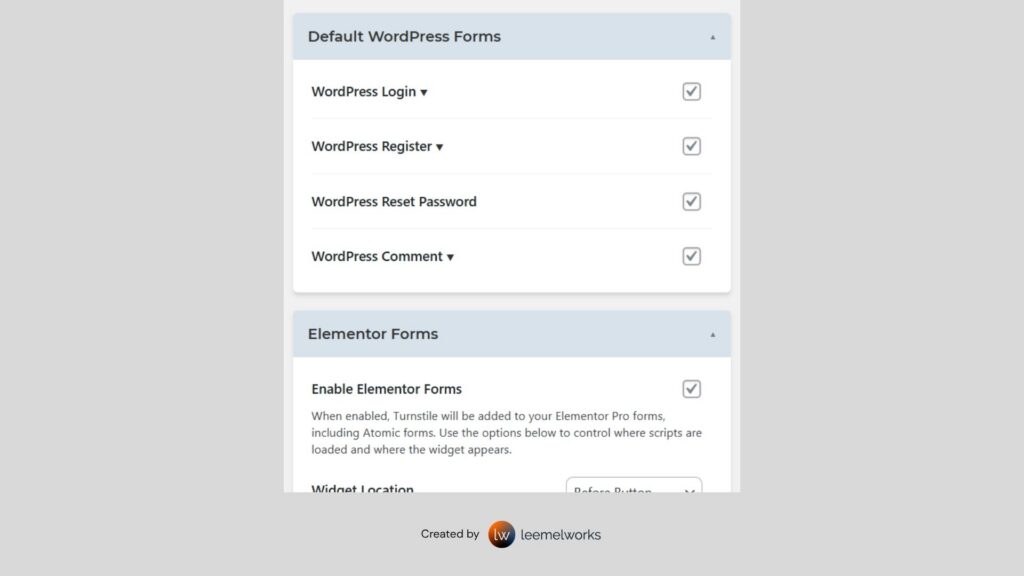
Step 3: Enable Protection on the Forms You Use
The plugin lists integrations for WordPress login, registration, password reset, and comments, alongside WooCommerce and several form builders. These include Contact Form 7, WPForms, Gravity Forms, and Elementor Pro Forms.
Choose the integrations that match your website. Settings can vary between versions, so follow the options shown in your installed plugin.
If you use Elementor Pro, enable its forms integration and check each form on the live page, including forms inside popups. The integration applies to Elementor Pro’s Form widget; it does not turn a regular Elementor button into a protected form.
Step 4: Replace Existing reCAPTCHA Protection
If your form already uses Google reCAPTCHA, plan the switch on staging first.
Configure Turnstile, remove the old reCAPTCHA field or integration from the same form, and test the replacement before applying the changes to the live website. Remove old scripts only after checking whether another form still depends on them.
Use one configured CAPTCHA integration per form. Overlapping integrations can make errors harder to diagnose and add unnecessary checks for visitors.
Step 5: Test the Complete Submission Process
Open your website in a private browser window so you can test as a visitor. Submit a genuine test enquiry and confirm that:
- The form displays and submits correctly.
- The success message appears.
- The enquiry reaches the intended inbox or storage system.
- Required-field errors do not prevent a second submission.
- The form works on mobile and in any popup where it appears.
If you protect login or checkout, test those flows separately. Keep your current administrator session open while checking login protection in another browser window.
Seeing a successful widget is only part of the check. Your form must validate the Turnstile token on the server before accepting the submission. A compatible integration handles this; simply adding a widget through an HTML block is insufficient.
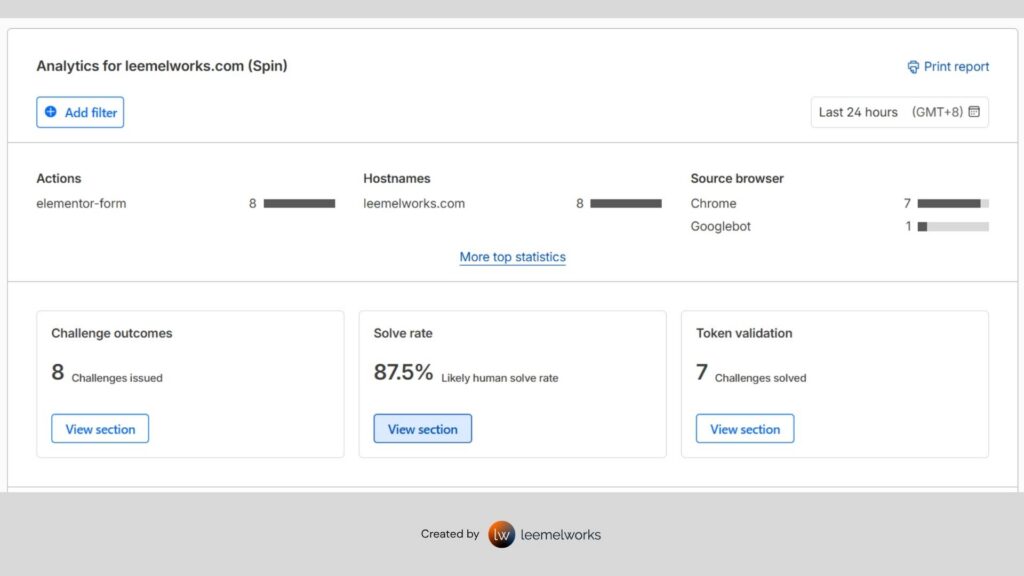
See the the actual Turnstile in action on our Contact page.
Benefits of Cloudflare Turnstile for WordPress Websites
Cloudflare Turnstile offers practical benefits for business websites when configured with a compatible form integration.
Less Automated Spam
Browser checks help identify bots before a protected submission is accepted. Fewer automated entries can mean less time sorting through junk enquiries.
Easier Verification for Visitors
Visitors avoid traditional image puzzles. Managed mode usually checks in the background and may show a simple checkbox when interaction is needed.
Privacy Focused Verification
Cloudflare says Turnstile processes only data needed for security and does not access, store or transmit form entries. Your form plugin still handles the submitted information.
Free Protection for Everyday Website Forms
The Free plan includes unlimited challenges within its widget and hostname limits. Form builders, hosting and installation services may have separate costs.
No Hosting Move Required
Use Turnstile without moving hosting or routing website traffic through Cloudflare. Create an account and configure a compatible integration.
Support for Different WordPress Forms
Compatible integrations can protect contact forms, comments, registration and login flows. Check support for your form builder and test each enabled form.
These benefits depend on correct server-side validation. Turnstile reduces automated abuse but does not guarantee that every spam message will be blocked.
How Cloudflare Turnstile Helps Reduce Spam
Turnstile checks browser signals to help distinguish legitimate visitors from automated tools. This can reduce bot-generated contact enquiries, spam comments and automated registrations on the forms where you enable it, leaving fewer unwanted entries to review.
After a successful check, Turnstile issues a short-lived token. Your WordPress integration sends it to Cloudflare for server-side validation and rejects submissions when verification fails. Tokens expire after five minutes and can be used only once, helping prevent reuse of a captured token. Displaying the widget without this validation does not protect the form.
Is Cloudflare Turnstile Safe to Use
Turnstile can provide an additional protection layer when used with a maintained, compatible integration. Keep your secret key private, restrict the widget to the intended hostnames and confirm that missing or invalid verification blocks submission. Continue using HTTPS, software updates, backups and secure administrator accounts.
Cloudflare describes Turnstile as privacy-preserving and says it does not use verification data for advertising retargeting. Browser and device information is still processed to perform security checks, so review its privacy documentation when updating your website privacy notice.
What Turnstile Cannot Block
Turnstile does not guarantee a spam-free inbox. A person can still pass verification and submit an unwanted message, and some automated abuse may get through. It does not filter messages sent directly to your email address or protect forms where it has not been enabled. It also does not replace a firewall, malware protection or secure form processing.
Troubleshooting Cloudflare Turnstile
The Widget Does Not Appear
Check that the correct integration is enabled and the plugin’s API test passed. Confirm that your selected widget mode should display a visible widget.
If the problem remains, investigate JavaScript errors and whether caching or performance settings delay the Turnstile script. Test changes on staging and narrow down the cause before changing your site’s wider performance setup.
Verification Fails
Check the keys and allowed hostname. Make sure the keys belong to the same widget and were copied without extra spaces.
Turnstile tokens expire after five minutes and can be validated only once. If someone leaves a form open for a long time, the integration needs to obtain a fresh token before submission.
Spam Still Arrives
Check which form receives the messages and whether protection is enabled there. Also confirm that failed verification blocks submission on the server.
Turnstile helps reduce automated abuse, but it cannot guarantee that every unwanted message will disappear. Human-submitted spam may still require moderation or additional filtering.
Frequently Asked Questions
Do I Need to Move My Website to Cloudflare
No. Turnstile can work on a website that uses another hosting provider and does not use Cloudflare’s proxy.
Can I Add Turnstile Using Only an HTML Widget
You can display the widget that way, but the form’s server-side processing must also validate the token. For an existing WordPress form, use a compatible integration that handles both parts.
Will Turnstile Improve My Google Rankings
It is a form-protection tool, rather than an SEO ranking feature. Its purpose is to help reduce automated submissions while keeping forms usable.
Need Help Protecting Your WordPress Forms
A working contact form should help customers reach you without filling your inbox with automated messages. Turnstile can support that goal when its setup and submission checks are configured correctly.
Need help adding Cloudflare Turnstile or troubleshooting your WordPress forms? Get in touch with LeemelWorks to discuss your website.